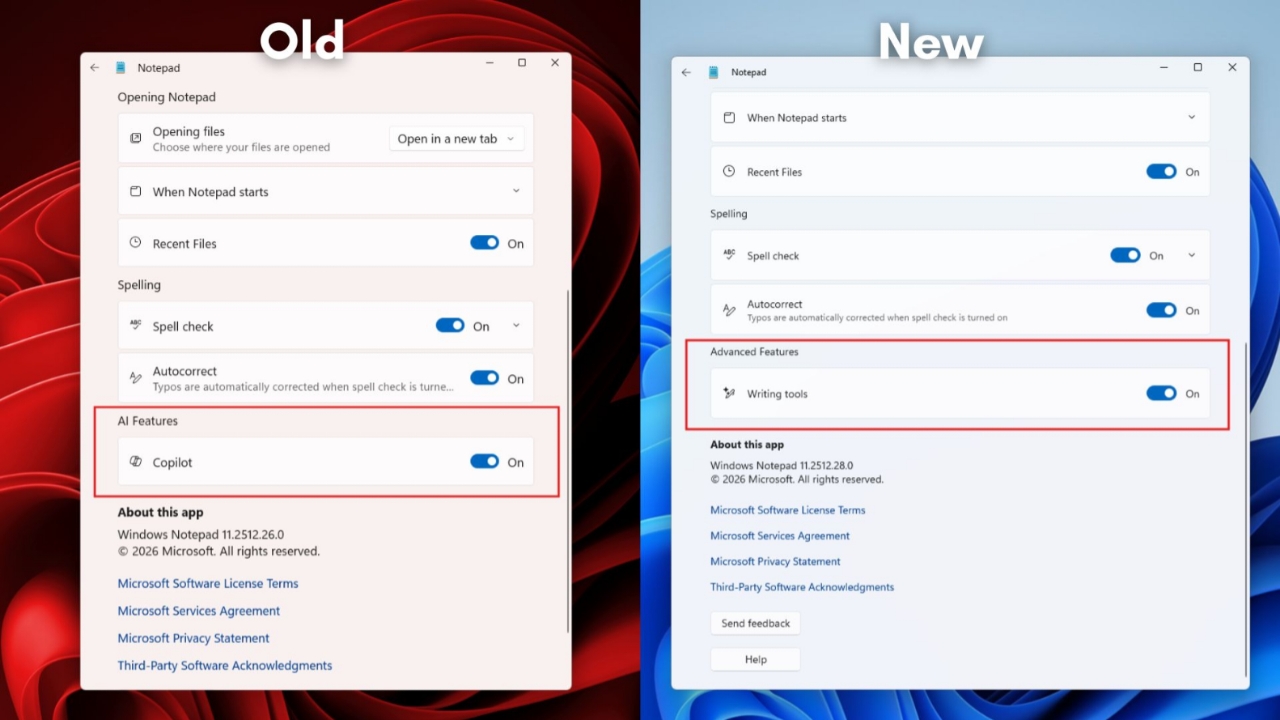
The Copilot button is now replaced with the tools menu. Users still get the same AI features without removal. Microsoft aims to simplify the experience and reduce clutter.
The Notepad version 11.2512.28.0 changes reflect a broader strategy across system apps. It also focuses on improving usability and performance.
Key Takeaways:
- Microsoft renames Copilot in Notepad, but AI features remain active.
- The Writing tools menu replaces the old Copilot button interface.
- Microsoft plans similar changes across more Windows apps.
Microsoft renames Copilot in Notepad
The Copilot button is now replaced by a pen icon. Users now see a “Writing tools” menu instead. This update appeared in Insider preview builds first.
Later, some users received it through Store updates. The updated Notepad version is 11.2512.28.0 build. Reports confirmed this change on production machines, too.
This includes apps like Photos and Snipping Tool. Widgets and Notepad are also part of this effort. The company wants a better design and a cleaner interface now.
Features and Settings
AI tools remain available inside the Writing tools menu. Users can rewrite text with tone and clarity changes. The summary feature helps shorten long content quickly.
There is also a prompt-based writing feature for users. Formatting helpers are still included within these tools.
- Rewrite tool changes tone and writing clarity.
- The summarise tool shortens long text into a shorter form.
- The Write tool creates content using simple prompts.
Settings inside Notepad also received small changes recently. AI features are now called “Advanced features” in settings. Users can enable or disable these tools anytime.
The toggle for writing tools moved into this section. The underlying AI system and workflow remain mostly unchanged. Only labels and placement have been updated clearly.
Industry Context and Future
Experts describe this update as a rebranding strategy. Some say it reduces the strong Copilot brand visibility. Others see it as a user experience improvement step.
Microsoft wants more meaningful AI integration across systems. The company focuses on useful and well-crafted experiences. It also plans to improve stability and reduce system bloat.
This move was planned earlier, according to reports. Microsoft was reviewing how AI appears across Windows.
Many Copilot buttons may be removed or replaced soon. Notepad is likely the first app showing this change.
- Paint may also see reduced Copilot presence soon.
- File Explorer has many Copilot hooks currently.
- More system apps could receive similar updates later.
This change affects feature discovery and user interaction. It also impacts testing and telemetry tracking processes.
Companies often adjust branding after a wide feature rollout. This helps improve usability and reduce user confusion.
The End Note
Users still access AI tools through the Writing tools menu. Only names and interface placement have changed recently. This reflects Microsoft’s new approach toward AI integration.
More apps may receive similar updates in the coming months. Overall, the experience becomes simpler and more efficient.
For the latest tech news, follow Hogatoga on Twitter, Facebook, and Google News. For the latest tech-related videos, subscribe to our YouTube Channel and Newsletter.