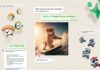
WhatsApp is rolling out a new custom emoji reactions feature for Android WhatsApp Plus users. With this feature, users can now customize the reaction tray. Plus subscribers can replace the default six emojis in the reaction tray with others they prefer.
Non-Plus users can see the custom emoji reactions feature but can’t use it. They will have to subscribe to WhatsApp Plus to use this feature.
Related Article: WhatsApp Now Supports New Languages for Voice Transcription
WhatsApp Plus Custom emoji reactions feature
The new custom emoji reactions feature has been discovered in WhatsApp for Android beta version 2.26.38.4. It adds the custom emoji reactions feature as a benefit for Plus subscribers. It simplifies reacting to messages using the emojis users prefer over the default emoji reactions.
How to customize the default reaction emojis on WhatsApp
WhatsApp Plus users can manage their custom reactions from the app settings. After this, they have to go to Chats and find the Default reactions section under it. In the Default reaction section, they will see the six current default emojis at the top of the screen.
They can choose a different emoji to replace the default one from the full keyboard. All the six emojis can be replace with any emoji and users can change as manay as they want to change the emoji. Once you are satisfied with the emoji changes, then save it, and the Meta-owned messaging app will update the reaction tray immediately with your new custom-replaced emoji.
How to edit reactions directly from the emoji keyboard
Users can now also manage the custom reactions without going to the WhatsApp Settings. They will see the default reactions section at the top of the keyboard when they open the emoji keyboard to react to a message. They can customize the reaction tray by tapping on the Edit option on the keyboard without leaving the current conversation.
For the latest tech news, follow Hogatoga on Twitter, Facebook, and Google News. For the latest tech-related videos, subscribe to our YouTube Channel and Newsletter.