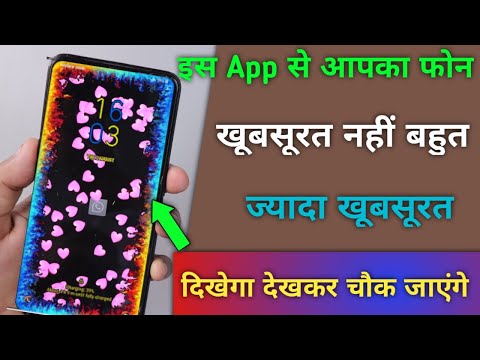

You must want to customize the app notification of your favorite app to look very unique. But you don’t know how to customize your notification and Today I am explaining to you about the Notification customization in Android. Read this post till the end to know more about this.
NotifyApp.
NotifyApp is one of the most popular apps that allows you to the customization of your notification on an Android phone.
Feature.
- Customize your notification of the app.
- Set the confetti.
- Customize your clock on your phone.
- Also, set the brightness level
How can you use the NotifyApp app on your phone?
Make sure you have already the NotifyApp, if you don’t, you must have to download this app. Now how can you download this app?
Go to the end of the post where you will find the download button. Press the download button to download and install the app on your phone. Open the app after installing and grant the Accessibility and media file permission to this app.
Also, Read Customize the volume style and function of the volume key on your phone.
You have to open the app section and select an app which notification you want to do customization on your Android and enable that app option once you grant permission to this app.
Click on the Confetti option and select your favorite confetti to show when your notification will come. After this click on the screen style and set the style of your Android screen how you want to see your notification.
You can also customize your clock style on the phone and the brightness level of your phone. Now when your notification arrives from that app it will show the beautiful style notification on your phone display.
For the latest tech news, follow Hogatoga on Twitter, Facebook, and Google News For the latest videos tech-related, Subscribe to our YouTube channel and Newsletter.